
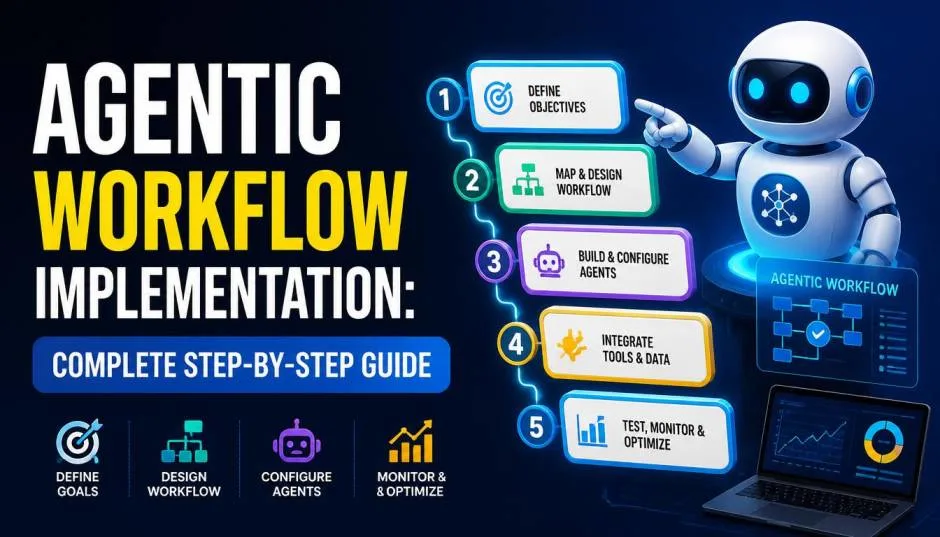
Agentic workflows are changing how businesses automate complex tasks. Instead of following rigid rules, these workflows use AI agents that make decisions and adapt as they go.
If you are searching for an agentic workflow implementation tutorial, this guide walks you through everything from the basics to deployment.
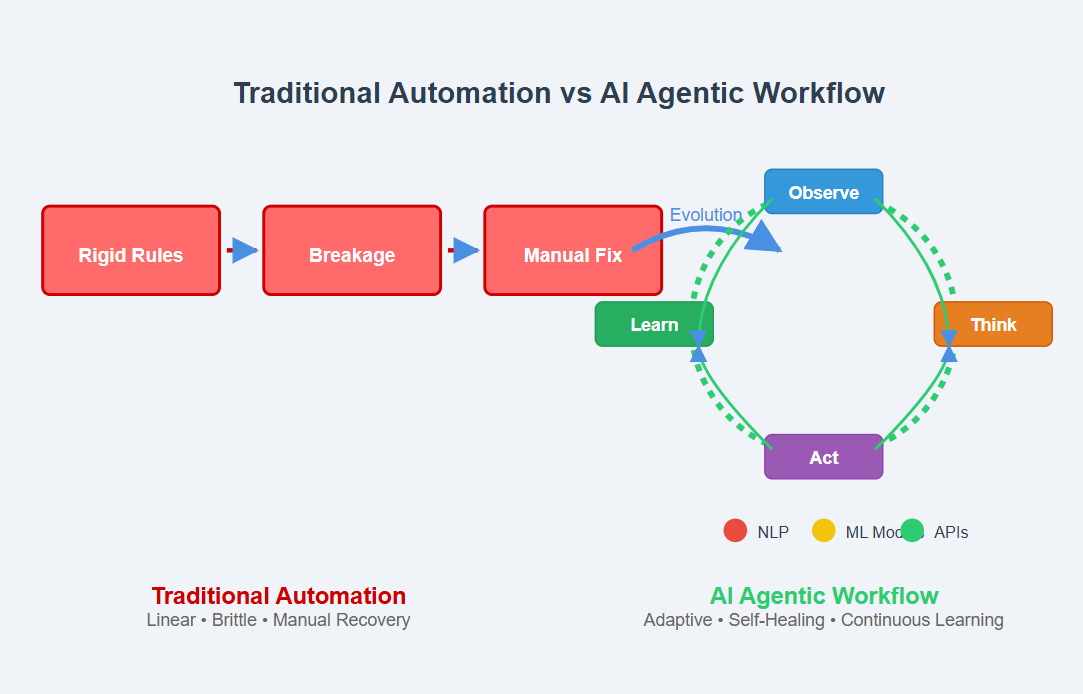
An agentic workflow is a sequence of tasks where AI agents make decisions dynamically . The agent interprets the goal and chooses its next action. It uses available tools, checks results, and revises its plan as needed.
Read Also: The Rise of Algorithmic Vetting: Is Your HR Tech Ready for USCIS AI?
The key difference from traditional automation:
Traditional workflow: Fixed rules, breaks on unexpected inputs
AI workflow: Predefined model steps, limited adaptability
Agentic workflow: Dynamic decisions within limits, handles variable tasks
The agent decides how to complete its part. The workflow describes how work is organized.
The agentic cycle is the engine behind these workflows. Here is how it works :
User sends a message with a goal
LLM analyzes the request and decides what to do
Tool calls happen if needed (search, APIs, databases)
Results come back to the agent
LLM analyzes the result and decides next step
Repeat until complete or generate final answer
This loop can run 10, 20, or even 30 times as the agent investigates a problem, gathers data, and synthesizes a report .
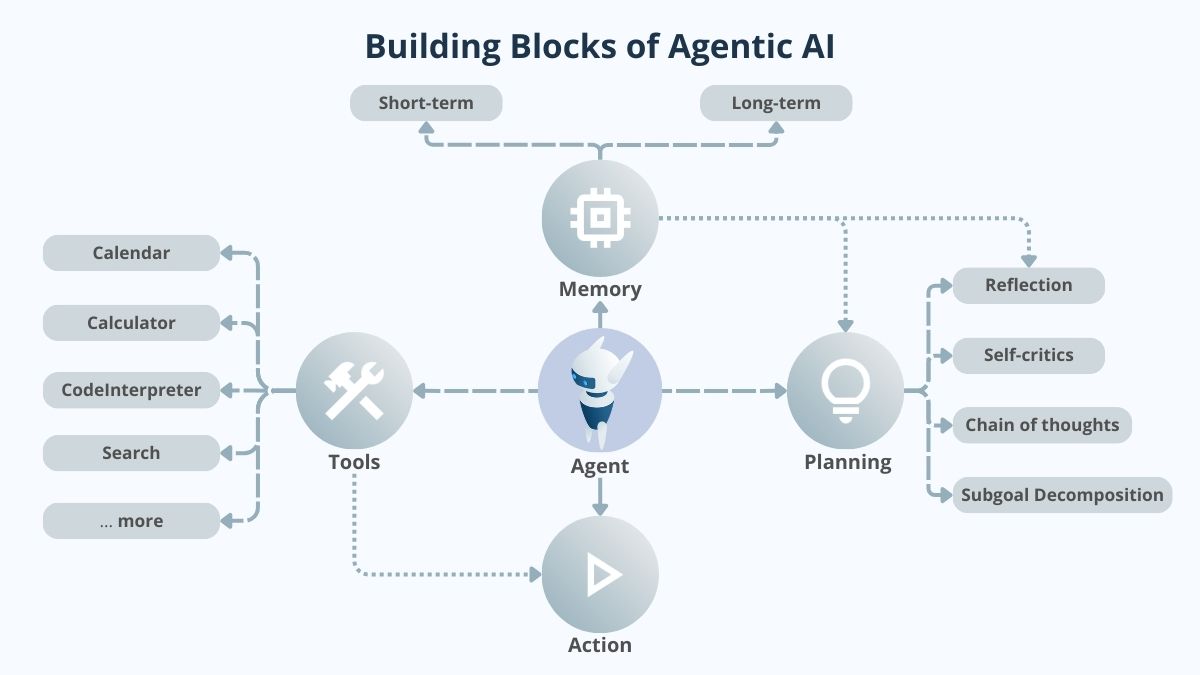
The implementation process follows a clear pattern. Here is how to build one.
Start with a specific outcome. "Research electric vehicles" is too vague. "Compare three charging strategies for a city fleet and produce a two-page recommendation" gives the agent a clear target.
You Must Also Like: Which AI Voice Agent Is Best for Small Businesses? Guide
Clear goals prevent the agent from wandering. The workflow needs completion criteria. When does the task end? What evidence is required?
You have several design patterns to choose from:
| Pattern | Use When |
|---|---|
| Baseline | Simple one-step tasks |
| Prompt Chaining | Sequential steps (2-4) |
| Routing | Need to classify and dispatch |
| Parallelization | Independent subtasks |
| Orchestrator | Multiple specialists needed |
| Evaluator | Quality iteration required |
For most workflows, the orchestrator pattern works best. A main agent delegates work to specialist sub-agents. Each sub-agent handles one part of the task.
Modern platforms offer drag-and-drop interfaces. Oracle's Agent Builder lets you :
Drag nodes to a canvas
Connect them to show data flow
Configure each node (prompts, models, tools)
Test in a playground environment
OpenAI's Agent Builder follows a similar pattern. You can build workflows with Agent nodes working sequentially .
Sample workflow structure: For a career coaching app, you might use three agents:
Resume extraction agent: Parses uploaded resumes and extracts skills
Career analysis agent: Identifies skill gaps for a target job
Course recommendation agent: Uses web search to find relevant courses
Each agent needs clear instructions and the right tools.
Resume extraction agent prompt:
text
Extract and summarize information from the input resume, organizing your output by category.
- Identify skills and professional experiences
- Extract supporting context for each skill
- Continue until all skills are extracted
Career analysis agent prompt:
text
Analyze skill and knowledge gaps for an individual to progress to a desired goal.
- Understand the goal and required skills
- Compare to what the individual already possesses
- Return the top 3-5 missing skills
Course recommendation agent prompt:
text
Identify online training courses that match identified skill gaps.
- Return 3-5 courses with details
- Include name, provider, reason, format, and URL
- Add a summary of your recommendations
This is where orchestration happens. The workflow determines the sequence.
Example: Resume extraction → guardrail (remove PII) → career analysis → course recommendation
The guardrail is important. It prevents personally identifiable information from propagating downstream.
Once built and tested, deploy your workflow to production.
Options for deployment:
Agent Builder hosted: Run workflows in the platform
Export as code: Use Agents SDK (Python or JavaScript/TypeScript)
Embed in chat: Use ChatKit for a front-end experience
The Agents SDK option gives you more control. You can run the workflow in your own environment and add custom functionality.
Use the Preview functionality to test your workflow. Upload sample inputs and see how the agents respond.
What to test:
Does each agent output the expected format?
Does the data flow correctly between nodes?
Are the guardrails working?
Does the final output meet the goal?
Several platforms help you build and deploy agentic workflows.
Agent Builder: Visual canvas for building workflows
ChatKit: Embed chat-based workflows in your app
Evals: Optimize performance with prompt optimization and trace grading
Drag-and-drop interface with nodes for actions, tools, and data sources
Multi-agent orchestration with hierarchical agent flows
Connectivity to enterprise systems and cloud APIs
Reusable templates for common scenarios
Native LLM integration with Text Complete tasks
Dynamic Fork for creating parallel tasks based on AI output
Robust workflow versioning for experimentation
Scalable and reliable for critical operations
Meta-framework built on Pydantic AI
Type-safe agent registration and management
Pre-built workflows with guardrails and translation
Composable with pydantic-graph
This pattern gives you control over the sequence while using agents for specific tasks. Unlike fully autonomous workflows, deterministic workflows follow a controlled path.
Trending Article: What's a Quantic School of Business and Technology 2025?
Example structure:
Fetch user preferences (non-agentic step)
Research trending keywords (agentic step)
Write a blog post (agentic step)
Print the final output (non-agentic step)
The agent iterates through a loop: read, reason, act, observe, repeat. It uses tools when needed and decides when the task is complete.
A main agent delegates tasks to specialist sub-agents. Sub-agents cannot spawn other sub-agents. All delegation flows through the main agent.
Unclear goals: The agent does not know when the task is complete. Always define clear completion criteria.
Missing guardrails: Without content safety checks, agents can output problematic content. Add guardrails between sensitive nodes.
No human approval points: For sensitive actions, pause the workflow for human review.
Overcomplicating the design: Start simple. Add complexity only when needed.
Best for:
Variable multi-step tasks
Tasks requiring tool use and reasoning
Scheduled monitoring and reporting
Code review and analysis
Customer support automation
Not ideal for:
Simple one-step tasks (use baseline)
Repetitive, stable processes (use traditional automation)
Interactive, conversational sessions (use a persistent service)
Agentic workflows combine the autonomy of AI agents with the traceability of workflows. They let you build systems that reason, use tools, and adapt to changing situations.
Start simple. Define one clear goal. Build a workflow with two or three agents. Test it with real data. Add more complexity as you learn.
The tools are available. OpenAI's AgentKit, Oracle's Agent Builder, and platforms like Conductor make implementation accessible. You do not need to be an AI expert to build these workflows. You just need a clear goal and a willingness to iterate.